 shanhui notes
notes on Articraft and thoughts on agentic 3D CAD design
3D modeling and CAD is an area of generative AI that i have been interested in for a few months. part of the reason is that i do part time consultation work with Chinese industrial battery factories to build the right batteries for specific markets needs like Singapore and LATAM. believe it or not, the primary means of communication is still WhatsApp (used to be fax and phones calls) when send specifications back and forth from factories and end market users. often a small tweak on a battery charger charge outlet placement can take days of sending blurry, slanted photos, and Google translated WhatsApp messages with manufacturers across 12 hour time differences delaying the sale and production.
so as a self taught applied ML engineer, i was excited when i saw the Artifact 10K project, not because it would solve all the industry issues i experienced, but because it showed a seed of what the future of agentic CAD design and highly technical B2B commerce might be.
what is Articraft 10K
to put in plain words, Articraft10K is agent harness, and a process to create articulated 3d models in URDF (unified robotics design format), and the resulting dataset of 3D objects. the goal of the project is to produce economical source of synthetic articulated 3D models for various applications in AI such as training and simulation. you can read the full paper here: https://arxiv.org/pdf/2605.15187
the core of Artifact agentic process is iterative coding, something general coding agents like ClaudeCode and Cursor are already good at. general agents like Cursor work through tool calls like bash, grep to read files in your repo. they can also search for info on the web to gather context on dependencies and gather market data like Cloudflare pricing for different products. these agents are versatile because they use tools that have universal flexibility. they are built upon the Unix substrate that links together tool calls together. thats why you could ask an Pi agent “what music is playing right now”, and it will write an Apple Script to query your music player for the song name and do a web search for it’s meta information. to the general populace, agents like Claw seem like magic, but to many technologist, this is what Unix has enabled for a long time, now it is just happening at the speed of tokens generation.
in the same way agents create a script to query what music is playing, agents can also learn to operate the language of 3D modeling such as CADQuery and OpenCascade if you provide it the enviroment, the prompt context, and proper set of tools. you can have it iterate on a model.py to create realistic articulated models of objects like a “4-axis agricultural sprayer drone”, instead of “text to text”, or “text to image”, it enables “text to 3D articulated object”, more on this later.
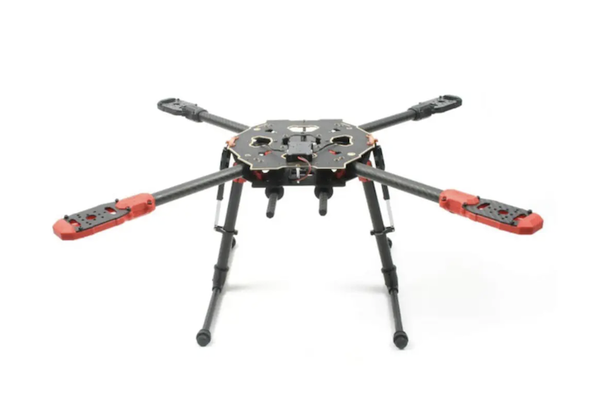
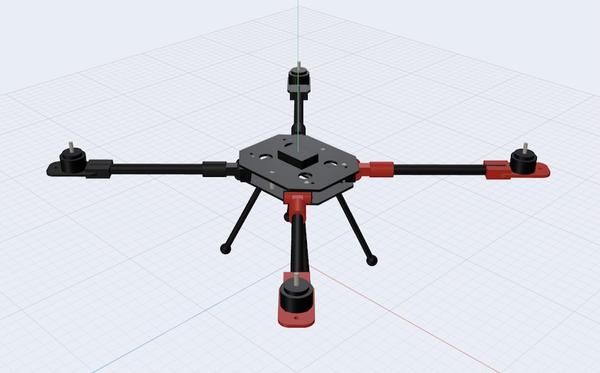
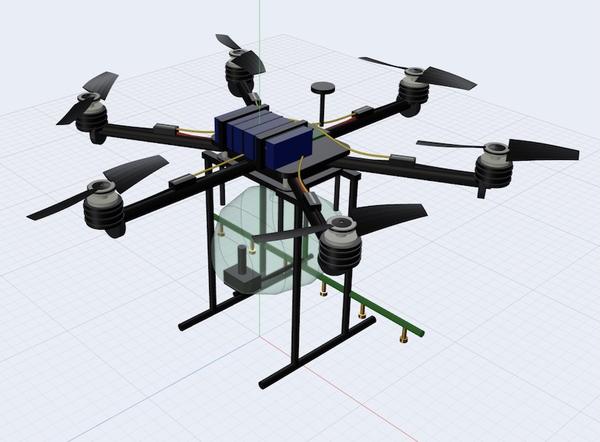
generating a 3D articulated object is as simple as uv run articraft generate --image path/to/reference.png "create a realistic drone frame based on the image"
reference image:
and the generated 3D model results:
Articraft internals indepth exploration
i was interested in not just what the system can do (which is incredible), but how the entire system works from an architecture systems perspective and lowering the cost of creating 3D CAD models at scale that was not feasible prior to general purpose LLMs and current developments of agent harnesses.
like all agentic harness systems, it uses common models like GPT-5.5 and Claude for the LLM brain, it can also connect with OpenRouter to make use of cost effective open weight models like Qwen and Minimax. in additional, i ended adding direct Deepseek v4 pro support as a first PR contribution.
the basic architecture is split up into 5 packages connected in a pipeline
CLI  ──▶  Agent (generation)  ──▶  Storage (persistence)  ──▶  Viewer (inspection)
              │
              ▼
           SDK (authoring surface — used by the LLM at generation time)
the /agent repo provides the primary agent loop and harness structure. it is responsible for calling the LLM providers like GPT and Claude, making tool calls, validating, and writing the final results to storage.
the SDK layer provides a set of primitives called `ArticulatedObjects, around 70+ geometric shapes like Box, Cylinder, BevelGear, and TireGeometry, as well as placement helpers and collison tools.
at each turn the agent iterates on a single file models.py that imports from the sdk and constructs an ArticulatedObject which the compiler executes to produce the URDF + mesh/GLB output.
there are tools in which the agent can call to validate common errors like collisions and disconnected parts, as well as code execution errors get surface to the agent as structured context.
the file system is the storage layer, the resulting models and trace logs are written here.
the viewer in a GUI inspection tool built with FastAPI (viewer/api/app.py) with routes for records, collections, runs, and status. the frontend ux is built with react + typescript using tailwaind.css and three.js as a single page app. pretty what you would expect for a 3D model viewer web GUI.
end to end generation workflow
- the articraft CLI parses the prompt from
articraft generate "4-axis agriculture drone", chooses the provider/model, creates arecord_idand staging directory. - the agent harness loads in the system prompt and SDK docs, and begins the iterative loop. the agent writes
model.pywith SDK primitives, callscompile_modelto check its work and iterates on errors. - when the agent is done iterating, the compiler constructs the ArticulatedObject. it runs geometry QC and exports the URDF XML, mesh files, and GLB viewer assets.
- the persistance layer writes the record, provenance, code, traces, and costs to
data/records/<id>/ - the Viewer loads the record from the browse index, serves the URDF and meshes, and renders the articulated 3D model in the browser with interactive joint controls
the model.py using CADQuery looks something like this
    # -----------------------------------------------------------------------
    # Frame body (root) - central hub
    # -----------------------------------------------------------------------
    frame_body = model.part("frame_body")

    hub_body = (
        cq.Workplane("XY")
        .circle(0.175)
        .circle(0.158)
        .extrude(0.10, both=False)
    )
    hub_dome = (
        cq.Workplane("XY")
        .workplane(offset=0.10)
        .sphere(0.175)
        .intersect(
            cq.Workplane("XY")
            .workplane(offset=0.10)
            .box(0.40, 0.40, 0.12, centered=(True, True, False))
        )
    )
    bot_plate = cq.Workplane("XY").circle(0.175).extrude(0.006)
    hub_full = hub_body.union(hub_dome).union(bot_plate)

    frame_body.visual(
        mesh_from_cadquery(hub_full, "frame_hub"),
        material=mat_plastic_body,
        name="hub_shell",
    )
a difference between the Articraft harness and general coding agents like Cursor is that the Articraft action space is more restrictive, it does not have access to the filesysten or ability to execute abitrary shell commands, reducing the operating surface and context to just the output of 3D objects.
the agent gets structured feedback from the harness in the form of warning reports on execution errors, geometric inconsistencies, and code quality issues. the agent can also request a probe of the model file to get measurements.
note on OpenCascade and FreeCAD
OpenCascade is the CAD kernal used by FreeCAD, both free and opensourced software. it is also used by KiCAD, a popular electronic design automation (EDA) software.
FreeCAD has an extension robot workbench, to import URDF models and the model.py files can be partially exported to STEP which is a standard CAD exchange format. although the step export is not implement into Articraft project as of right now.
because FreeCAD has python sdk, it might also be possible to have Articraft directly operate on FreeCAD instead of CADQuery with some tweaks, although there are some challenges for anyone who wants to try
- FreeCAD depends on the Qt GUI lib, which is heavy and takes some time to boot, although there seems to be a headless mode
- FreeCAD document model is a stateful GUI based, whereas model.py is a pure function
- Articraft executes LLM generated code in a sandbox for security reasons whereas FreeCAD runs on your main OS
reading through Reddit and HN, a often raised complaint is that FreeCAD is not the easiest software to learn and get good with. what if we can make an agent use it instead?
evaluation of generated Artifact assets
in the paper, there is section on how the research team evaluates the quality of generated assets. they conducted an experiement with 125 non expert college students with 40 random assigned objects, generating over 5000 comparisons. the participants would rank the top 3 in terms of quality, and accuracy to prompt alignment.
GPT-5.5 scored the best with 42% of first place, 28% for second. It also compared against GPT-5.5 alone with Codex (OpenAI’s general coding agent), and GPT-5.5 with Articraft scored substantially better which is evidence that a narrow vertical based agent harness can outperform general harness on both quality and cost.
Deepseek v4 Pro + Articraft = low cost generation at scale?
the first thing i did after git cloning the project repo was to see how Deepseek latest model v4 Pro (my daily driver), would perform against the US frontier models. but alas the model was not supported and i did not know a OpenRouter account.
adding new models is straightforward with how the project is setup, just add another LLM ProviderClient in agent/providers and wire it up to the harness and rest of the pipeline. i used deepseekv4pro itself with CC/Pi agent harness to do the heavy lifting. deepseek uses an OpenAI compatible API just like OpenRouter does. ProviderClient itself is a “duck-typed” protocol with methods build_request_preview(), context_window_pressure(), prepare_next_reqeust(), generate_with_tools() which every llm provider must implement and the methods are checked by def create_provider_client(...) -> ProviderClient in factory.py
deepseek was integrated after around 1000 lines of code later with 1M context window which should be plenty for the default 100 max iteration rounds. the cost for deepseek v4pro is roughly 1/15th of GPT-5.5:
  DEEPSEEK_V4_PRO_PRICING = {
      "input_uncached": 0.435,     # $0.435/M input tokens
      "input_cached": 0.003625,    # $0.003625/M cached input
      "output": 0.87,              # $0.87/M output tokens
  }
this is a deepseek generated articulated drone for around $0.05 and ~40 rounds
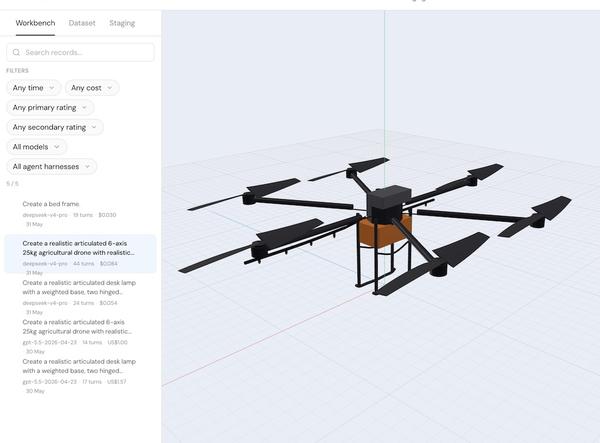
compared with GPT-5.5 generated drone using the same prompt for $1.25
alright, so we know the cost is much cheaper, but what about the output quality?
well… deepseek does not quite match the accuracy and fidelity of models like GPT-5.5 yet for articulated 3D design yet..
using another forklift example, deepseek would have wheels and the attachement off positioned and disconnected, whereas GPT would create a accurate whole forklift contruction that is usable with some tweaks.
for simpler shapes like bed frame, battery packs, lamp, deepseek seems to do a decent job with the current implementation.
notes on improving the quality of deepseekv4pro performance
one thing i noticed is that the thinking traces of deepseek is much longer than gpt thinking trace, but that could be because OpenAI hides the full thinking trace from API request?
i think there are some tweaks with max tokens, temperatures, and context compaction that can further optimise deepseek generation quality. for example, GPT-5.5 uses mini to compress the context after a certain percentage of context window is filled, so we could use Deepseek to do the same thing with deepseek-v4-flash.
the other downside of deepseek is that is does not have vision capabilities through the api, so you can not pass in —image ref.jpg to help steer the model design iteration. i expect multimodel to be coming soon for deepseek and looking forward to integrate this when it is available.
there are most certain some improvements and optimisations we can make so will be updating with more information as we make more progress.
3D models as an communication tool
instead of CAD designs being a asset created by professional designers and engineers as pre production asset, we might have them part of an earlier process, integrated in the discovery process where customers might tweak 3D models, test out different materials and texture, change dimensions in a template, then submit it to manufacturers as part of the intro discovery process. there is a ton of benefit to introduce CAD assets earlier to improve communications around specs and scope of the manufacturing work. this was not possible before due to the high cost of creating quality models and and rare of such talent.
and what if both clients and manufacturers can co-design 3D models just through their chat conversations in real time? how much faster would new products get built when humans and agents can collaberate to articulate and shape their ideas at the speed of thought? the final assets can then be exported for the hardware and production engineers to make final edits in their prefered CAD software of choice and start production. in such a future, we might see a plethora of new physical projects for every niche enviroment and use case.